 agent-swarm.dev
Open Oncall
An alert lands in Slack, the swarm finds the root cause, a person approves the fix in one click, and the swarm opens the PR. If one AI provider is down, the step reroutes to another. One workflow, one failover sub-workflow, one script and an app, ready to import.

Sleep better without relying on a single provider.
Open Oncall is an open source on-call workflow for Agent Swarm. A PagerDuty incident fires (or Datadog, Grafana, Opsgenie, Sentry, SigNoz, any webhook). The swarm opens a Slack thread, investigates the code, git history and telemetry, posts the root cause with a one-click approval link, and opens the fix PR once a person approves. If the provider running a step fails, the same step re-runs on the next harness: Claude, then Codex, then OpenCode.
What you import
Every file lives next to this page on the docs site. Download it, fill the placeholders, import it.
| File | What it is |
|---|---|
open-oncall.workflow.json | The main workflow: 9 nodes, webhook and slack.message triggers |
open-oncall-failover.workflow.json | The failover block, a sub-workflow used by investigate and fix |
open-oncall.script.ts | Global script open-oncall: ops intake, pick, findings, close |
open-oncall-app-sync.script.ts | Script that projects workflow runs into the app |
open-oncall.app.json | The Open Oncall app definition |
pagerduty-incident-triggered.sample.json | A PagerDuty v3 incident.triggered payload to test with |
Prerequisites
- Agent Swarm with a Lead and the Slack integration connected. The bot must be a member of your on-call channel.
- Two or more providers. At least two online workers on different harnesses among
claude,codexandopencode. One worker per harness is enough. Failover needs a second harness to fail over to. - A repo the workers can clone and open PRs on, with the GitHub integration set up.
- An alert source. PagerDuty (v3 webhooks), or anything that can POST JSON: Alertmanager, Grafana, SigNoz, Datadog, Opsgenie, Sentry. To let investigators read traces and logs, connect your observability MCP (for example SigNoz) to the workers. Without it they work from code, git history and CI.
Install
Run these as your Lead. The Lead must create the workflow: its Slack posts go through slack-post, which only a lead may call.
export SWARM_URL=https://api.example.com   # your agent-swarm API
export API_KEY=...                         # swarm API key
export LEAD_ID=...                         # your Lead's agent id
H=(-H "Authorization: Bearer $API_KEY" -H "X-Agent-ID: $LEAD_ID" -H "Content-Type: application/json")
DOCS=https://docs.agent-swarm.dev/playbooks/open-oncall
1. The script and the webhook secret.
curl -s $DOCS/open-oncall.script.ts \
  | jq -Rs '{name: "open-oncall", scope: "global", source: ., description: "Open Oncall steps"}' \
  | curl -s "${H[@]}" -X POST $SWARM_URL/api/scripts/upsert --data-binary @-

export ONCALL_TOKEN=$(openssl rand -hex 24)
curl -s "${H[@]}" -X PUT $SWARM_URL/api/config \
  -d "{\"scope\":\"global\",\"key\":\"OPEN_ONCALL_WEBHOOK_TOKEN\",\"value\":\"$ONCALL_TOKEN\",\"isSecret\":true}"
2. The failover block.
FAILOVER_ID=$(curl -s $DOCS/open-oncall-failover.workflow.json \
  | curl -s "${H[@]}" -X POST $SWARM_URL/api/workflows --data-binary @- | jq -r .id)
3. The workflow. Fill your channel, repo, PagerDuty service name and approver. GET /api/users lists user ids.
CHANNEL=C0123456789                 # Slack channel id for alerts
REPO=acme/checkout                  # the repo Open Oncall may fix
SERVICE=checkout-api                # PagerDuty service name that maps to REPO
DASHBOARD=https://app.agent-swarm.dev  # where approvers open "Review & respond"
APPROVER=$(curl -s "${H[@]}" $SWARM_URL/api/users | jq -r '.users[] | select(.email=="you@example.com") | .id')

WORKFLOW_ID=$(curl -s $DOCS/open-oncall.workflow.json \
  | sed -e "s|<FAILOVER_WORKFLOW_ID>|$FAILOVER_ID|g" -e "s|<SLACK_CHANNEL_ID>|$CHANNEL|g" \
        -e "s|<OWNER>/<REPO>|$REPO|g" -e "s|<PAGERDUTY_SERVICE>|$SERVICE|g" \
        -e "s|<DASHBOARD_URL>|$DASHBOARD|g" -e "s|<APPROVER_USER_ID>|$APPROVER|g" \
  | curl -s "${H[@]}" -X POST $SWARM_URL/api/workflows --data-binary @- | jq -r .id)
echo "Webhook URL: $SWARM_URL/api/webhooks/$WORKFLOW_ID"
SERVICE_REPOS takes several pairs (svc-a=org/a,svc-b=org/b). Only repos in ALLOWED_REPOS are ever touched.
4. Point PagerDuty at it. In PagerDuty, add a Generic Webhook (v3) subscription for incident.triggered with the webhook URL above and a custom header X-Open-Oncall-Token set to $ONCALL_TOKEN. Other event types stop at gate. Any other source uses the same URL and header.
5. Fire a test alert.
curl -s -X POST $SWARM_URL/api/webhooks/$WORKFLOW_ID \
  -H "Content-Type: application/json" -H "X-Open-Oncall-Token: $ONCALL_TOKEN" \
  --data "$(curl -s $DOCS/pagerduty-incident-triggered.sample.json | jq --arg s "$SERVICE" '.event.data.service.summary = $s')"
The sample payload names the checkout-api service; the jq call swaps in yours. The intake script also accepts Alertmanager or Grafana (status, alerts[]), Datadog (title, body, alert_transition), Opsgenie (action: Create), Sentry (data.issue or data.event) and plain JSON {alertText, service?, repo?}.
The Slack approval flow
The bot posts the alert as the thread root, then "Investigating" with the planned provider chain. When the investigator finishes, it posts the root cause, the evidence, the proposed fix and a Review & respond link. One click opens the approval request in the dashboard.
- Approve: the fix step opens one PR on the repo. Nothing is merged.
- Reject, or no answer within 6 hours: the incident is handed to a human.
- Only people listed in
approverscan answer. Agents get a 403.
The last message in the thread is the outcome: the PR, time to root cause, time to PR, and which provider handled each step.
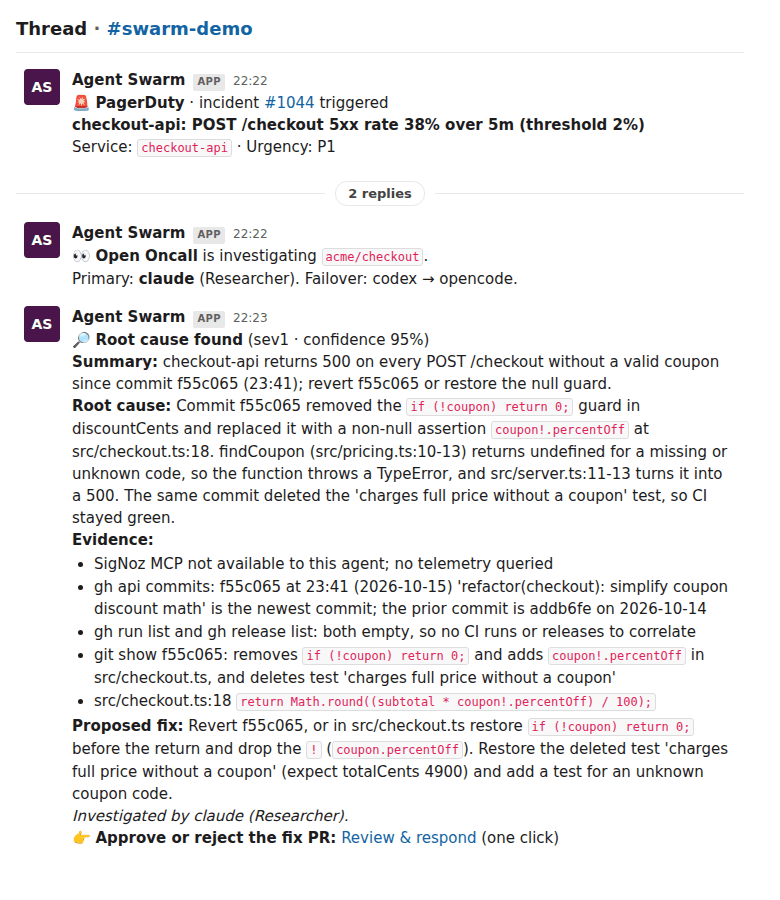
Alerts can also come from Slack itself: a human message in a channel listed in ALERT_CHANNELS that matches ALERT_PATTERN starts a run. Bot messages never do, so point alerting tools at the webhook instead.
Provider failover
The engine's node retry re-runs the same agent, so the reroute lives in the workflow:
intakereads the live agent registry and plans a chain per step: one online worker per harness, inPROVIDER_ORDER(claude,codex,opencode), best capability match first.- The failover block runs the step on the first worker. A failed attempt turns into a
[FAILED: reason]output instead of failing the run. - A
property-matchsees[FAILED:and sends the same prompt to the worker on the next harness, up to three attempts. pickreturns the first success and one provider record per attempt: harness, agent, model, status, reason, and whether it looked like a provider error.closewrites those records to the run output (providers.investigate,providers.fix) and to the last Slack message.
Drill it with simulateProviderDown
Add simulateProviderDown to any trigger. The attempt on that harness fails on purpose, as a real task, and the step moves to the next provider.
curl -s "${H[@]}" -X POST $SWARM_URL/api/workflows/$WORKFLOW_ID/trigger \
  -d "{\"channelId\":\"$CHANNEL\",\"repo\":\"$REPO\",\"simulateProviderDown\":\"claude\",
       \"alertText\":\"[FIRING] $SERVICE: POST /checkout 5xx rate 41% over 5m. Failover drill.\"}"
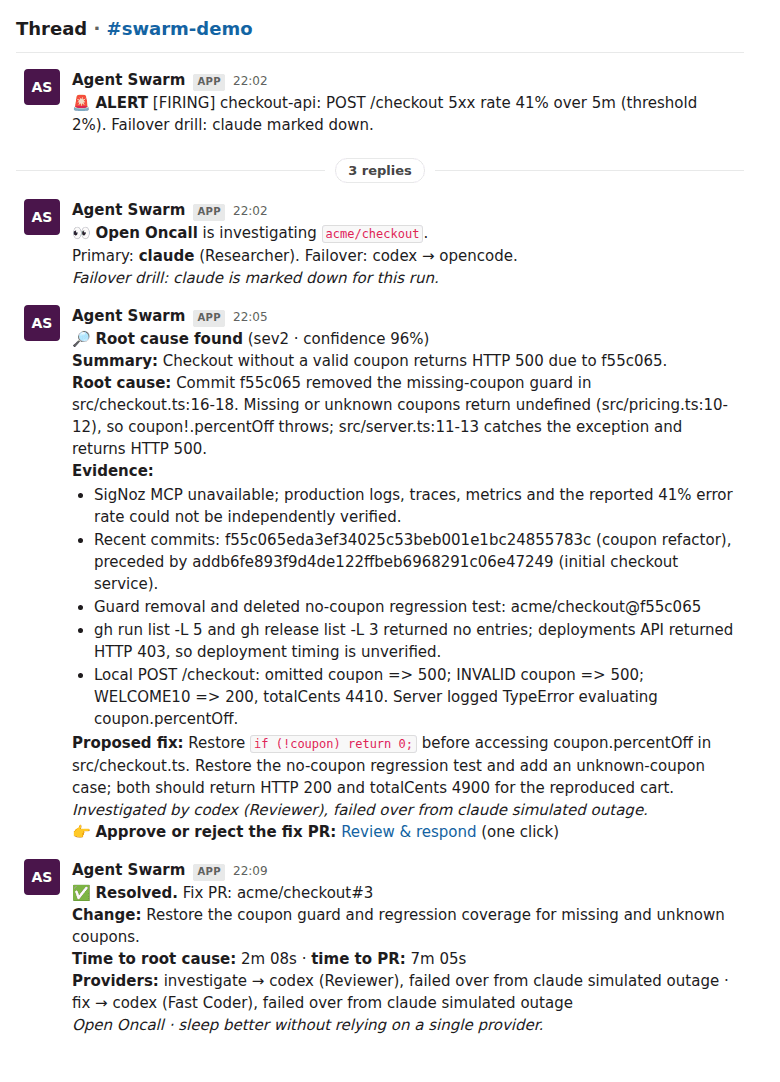
The thread marks the run as a drill, and the outcome names the reroute: investigate → codex, failed over from claude simulated outage.
The app
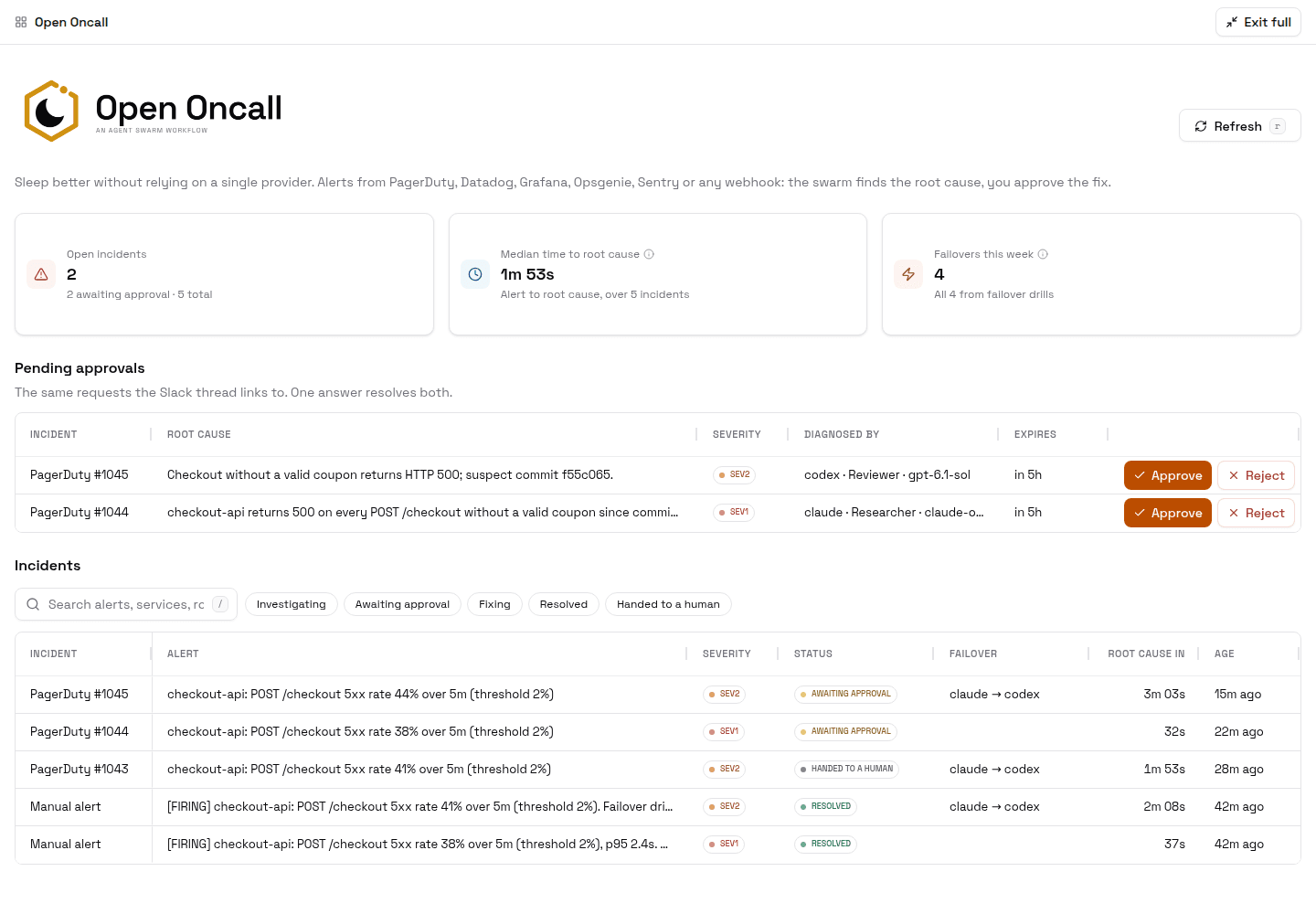
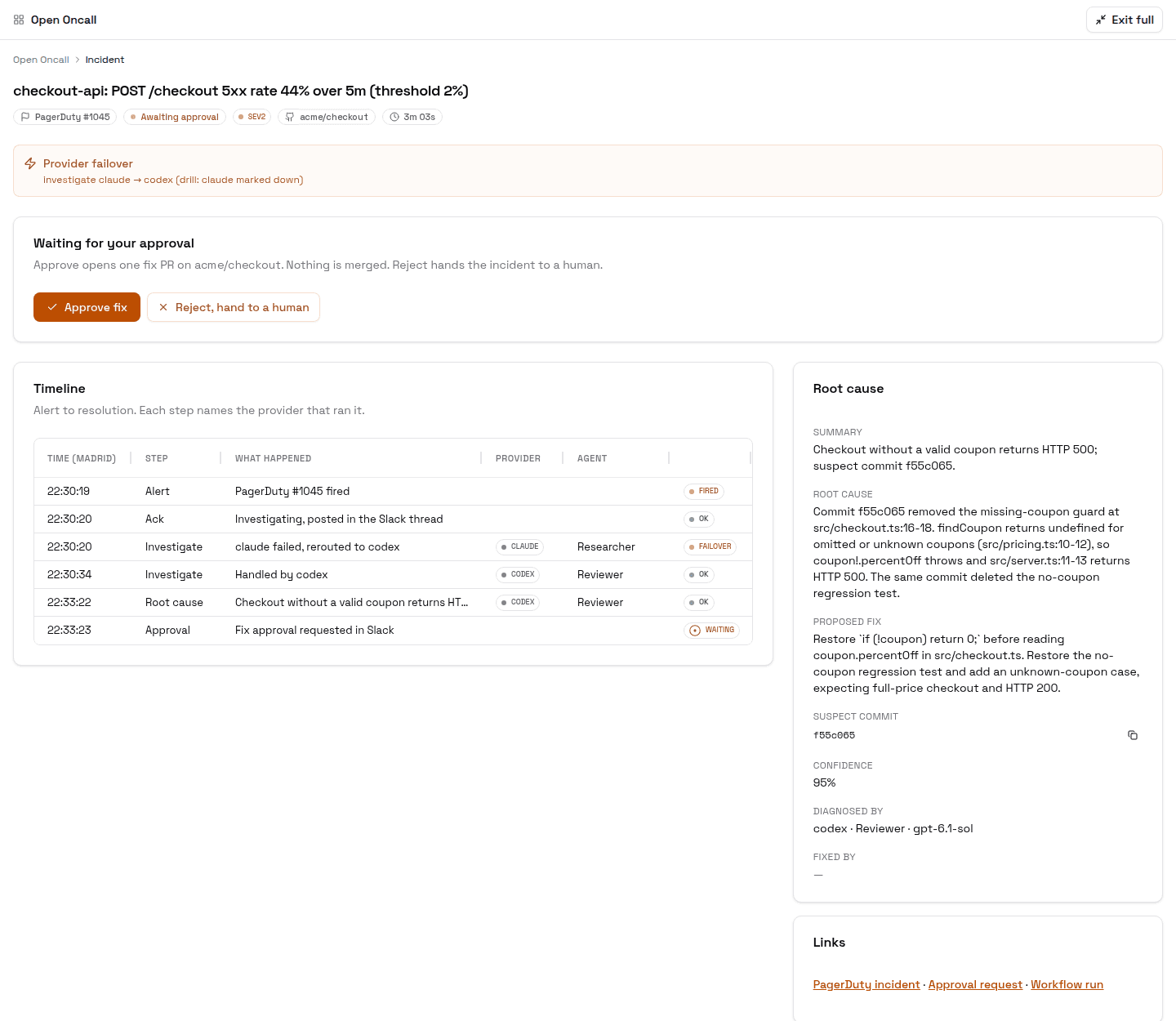
The Open Oncall app reads the workflow's runs and shows:
- Incidents: status (investigating, awaiting approval, fixing, resolved, handed to a human), severity, failover, time to root cause and age.
- Pending approvals: Approve and Reject answer the same request the Slack thread links to, so one answer resolves both.
- Incident detail: the timeline from alert to resolution, with the provider, agent and model of every step. Failed attempts show as
FAILOVER.
To install it, save the sync script, create the app with its id, and refresh it every 2 minutes with the seeded app-sync-run script:
curl -s $DOCS/open-oncall-app-sync.script.ts \
  | sed -e "s|<OPEN_ONCALL_WORKFLOW_ID>|$WORKFLOW_ID|" -e "s|<DASHBOARD_URL>|$DASHBOARD|" \
  | jq -Rs '{name: "open-oncall-app-sync", scope: "agent", source: .}' \
  | curl -s "${H[@]}" -X POST $SWARM_URL/api/scripts/upsert --data-binary @-
SYNC_ID=$(curl -s "${H[@]}" "$SWARM_URL/api/scripts?scope=agent" \
  | jq -r '.scripts[] | select(.name=="open-oncall-app-sync") | .id')

APP_ID=$(curl -s $DOCS/open-oncall.app.json | sed "s|<SYNC_SCRIPT_ID>|$SYNC_ID|g" \
  | curl -s "${H[@]}" -X POST $SWARM_URL/api/apps --data-binary @- | jq -r .app.id)

curl -s "${H[@]}" -X POST $SWARM_URL/api/schedules -d "{\"name\":\"open-oncall-app-sync\",
  \"targetType\":\"script\",\"scriptName\":\"app-sync-run\",\"scriptArgs\":{\"appId\":\"$APP_ID\"},\"intervalMs\":120000}"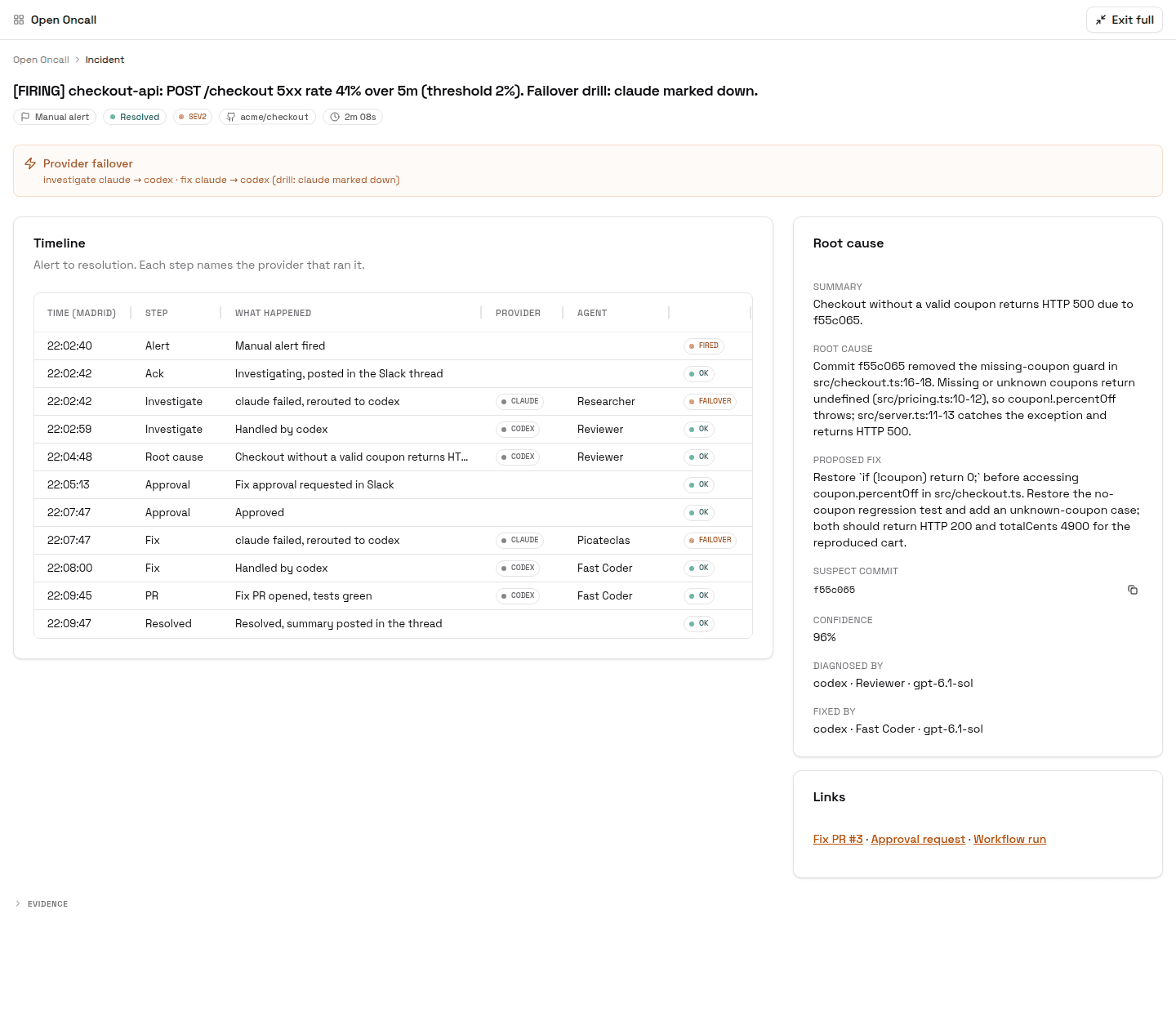
The app is built with the Apps feature. Ask your Lead to restyle it or add views with the apps skill.
Limits
- Approval is a link, not Slack buttons. "Review & respond" opens the dashboard; the app's Approve and Reject buttons answer the same request.
- PagerDuty signatures. The trigger checks the
X-Open-Oncall-Tokenheader, not PagerDuty'sX-PagerDuty-Signature. - Failover fires on any failed attempt, not only provider errors. Each provider record says which kind it was.
- A fully offline harness does not fail its task. If a worker never claims the task, failover does not fire. There is no per-step timeout yet.
- Every human message in an alert channel starts a run that stops at
gate. Filter runs onintake.result.accept = true.
Email Domain Health
A daily monitor for the domains you send mail from. One saved script checks SPF, DKIM, DMARC, MX, provider records and blocklists on two DNS-over-HTTPS resolvers, sends one test email and captures its score, counts bounces, writes history to a Swarm App, and alerts only when something gets worse.
Hot Patterns
Five patterns that recur across every playbook — litmus tests, drain loops, HITL gates, per-customer working directories, and no-op workflows. These are the recipes that compound, regardless of which use case you're building.