 agent-swarm.dev
Video Review
Comment on a video at exact frames, with marks on the picture, and send each review round to your agents. Try it in the browser or install it in your swarm.
An agent can render a video. It cannot see what you see in it. "The cut at 8 seconds jumps" is easy to say and hard to act on: which frame, which part of the picture, how long?
Video Review is a small tool for that gap. A person marks ranges on a timeline, draws on the picture, and writes what must change. The agent gets each comment as data: the frames, the seconds, the text, and the marks as coordinates. Then it makes the next cut.
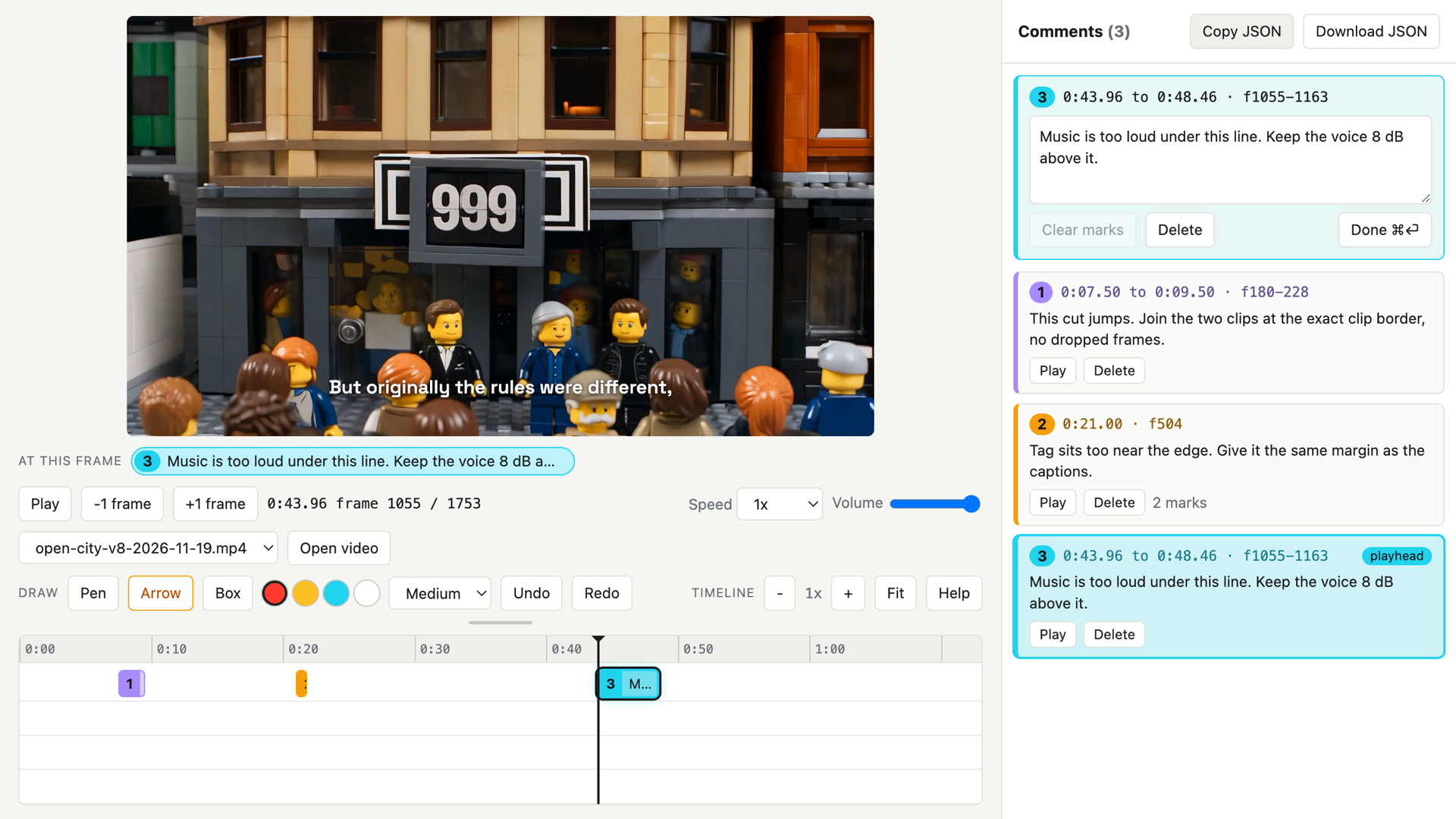
It comes in two versions. Both live in examples/video-review.
| Version | Where the video is | Where the comments go | Needs |
|---|---|---|---|
| Local page | A file on your computer | The browser, then a JSON file you give to your agent | A browser |
| Swarm app | agent-fs | A feedback file next to the video, and one swarm task for each round | Pages, Apps, agent-fs |
The loop
- An agent makes a cut.
- A person opens the cut, comments, and sends the round.
- The agent applies each comment, writes a new file next to the old one, and answers with a link to review it.
- Repeat until the person has no more comments.
The tool only carries the comments. What makes the loop work is the agent's side: it reads the marks, it asks when a comment can mean two things, and it never overwrites the cut that was reviewed.
Try it with no install
Open video-edit.agent-swarm.dev. It is one HTML file with no server.
- Set the frame rate, then choose a video or drop a file on the page. The file is read through a blob URL: the video and your comments stay on your computer. The public site counts visits with Plausible. A copy that you open from a clone makes no request to another origin.
- Comment. Drag in the timeline to make a range. Drag on the picture to draw with the pen, the arrow, or the box. Type in the text box and press
Cmd+Enter. The Help button lists every key. - Press Download JSON (or Copy JSON) and give the file to your agent with the video.
Comments are saved in the browser under the file name. Give each new cut a new file name, so it starts with an empty list.
Give the export to an agent
A coding agent on your machine can read the JSON as it is. The marks are numbers, so let the agent also see them drawn on the frames:
curl -fsSLO https://raw.githubusercontent.com/desplega-ai/agent-swarm/main/examples/video-review/render.py
uv run --no-project --with pillow python -I render.py film-v8-feedback-v1.json marked/ --video film-v8.mp4
render.py prints each comment with its time range and writes one frame for each comment with the marks on it. It needs ffmpeg.
A prompt that works:
Here is a review of film-v8.mp4: film-v8-feedback-v1.json, with one marked frame for each comment in marked/.
Look at each marked frame before you read the text of its comment.
Answer with a table: comment number, how you read it, the change you will make.
If a comment can mean two things, ask me. Do not guess.
Write the new cut as film-v9.mp4. Do not overwrite film-v8.mp4.
The export format is in the README.
Install it in your swarm
The swarm version removes the file hand-off. The video comes from agent-fs, the comments save next to it, and Send to swarm makes one task for each round.
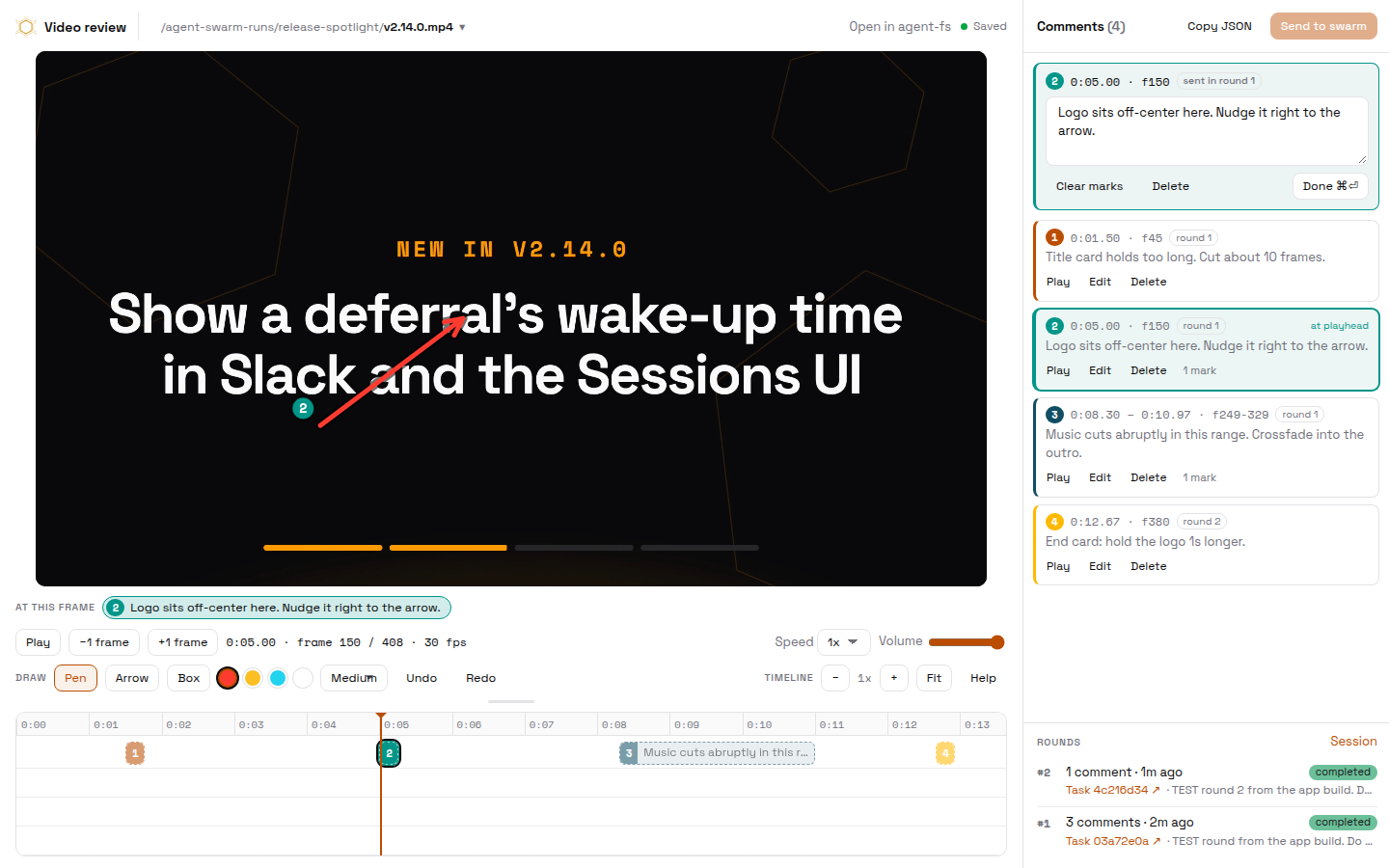
It installs three things:
- a Page: the reviewer, served to signed-in dashboard users (see Pages tools)
- a Swarm App: one row for each reviewed video, an
apiaction backed by a script, and asendaction that creates the task (see Apps) - a script,
video-review-api: lists the videos in the drive, signs a video URL, and writes the feedback file
Prerequisites
- The API server's
CAPABILITIESincludepages. This enables Pages and Apps. - agent-fs is connected to the swarm (see agent-fs co-deployment). Your videos are in its default drive.
- The agent that runs the installer has an
AGENT_FS_API_KEYconfig secret with read and write access to that drive. The script reads the key at run time. The key never enters the page.
Run the installer
Ask an agent to do it, or run this in a worker container:
mkdir -p video-review/scripts video-review/page && cd video-review
RAW=https://raw.githubusercontent.com/desplega-ai/agent-swarm/main/examples/video-review/swarm
curl -fsSL -o install.sh "$RAW/install.sh"
curl -fsSL -o app-definition.json "$RAW/app-definition.json"
curl -fsSL -o scripts/video-review-api.ts "$RAW/scripts/video-review-api.ts"
curl -fsSL -o page/index.html "$RAW/page/index.html"
curl -fsSL -o SKILL.md "$RAW/SKILL.md"
bash install.sh
Read install.sh before you run it: it calls your swarm's API with the worker's key. It saves the script, creates the app, creates the page, and links them. It prints the app URL and the reviewer URL. It keeps the ids in install-state.json, so a second run updates the same script, app, and page.
| Variable | Effect |
|---|---|
VR_SEND_AGENT_ID | The agent that receives review rounds. Empty means the default assignment, which is your lead. |
VR_SCRIPT_NAME, VR_PAGE_SLUG, VR_APP_NAME | Rename the script, the page slug, and the app. |
VR_DASH, VR_FS_API, VR_FS_ORG, VR_FS_DRIVE, VR_FS_LIVE | Override the dashboard URL and the agent-fs values that the worker environment gives. |
Then save SKILL.md as a skill named video-review, so your agents know how to open a video, read the feedback, and answer a round.
The bundle README also has the steps to install by hand with the MCP tools (script-upsert, app-upsert, create_page).
Use it
- Open a video.
<dashboard>/pages/<pageId>?path=<url-encoded agent-fs path>, for example?path=%2Fvideos%2Flaunch%2Fteaser-v3.mp4. With nopath, the page shows a picker over every video in the drive. An agent that finishes a cut can put this link in its answer. - Comment. The same timeline, marks, and keys as the local page. Every change saves to
<video-dir>/.review/<video-stem>.feedback.json, next to the video. - Send to swarm. The comments not sent yet become one task: the video link, the comments, and the path of the feedback file. The rounds panel links to each task and its session.
- Next cut. The agent writes a new file next to the old one and answers with the review link for it, with its task id as
parent. A round sent from that link hasparentTaskIdset, so every round of one video is in one task thread.
What the agent gets
A round task has the comments with their time ranges and the number of marks. The marks are in the feedback file:
{
  "video": "/videos/launch/teaser-v3.mp4",
  "fps": 30,
  "comments": [
    {
      "id": 2, "inFrame": 150, "outFrame": 150, "startSec": 5, "endSec": 5.033,
      "text": "Logo sits off-center here. Nudge it right to the arrow.",
      "strokes": [
        { "tool": "arrow", "color": "#ff3b30", "width": 0.005, "frame": 150, "points": [[0.2992, 0.6994], [0.4493, 0.4993]] }
      ],
      "sentIn": 1
    }
  ],
  "iterations": [{ "n": 1, "taskId": "<task id of round 1>", "parentTaskId": null, "note": "First pass" }]
}
Points are shares of the frame: [0,0] is top left and [1,1] is bottom right. sentIn is the round that sent the comment. A comment with no sentIn is not sent yet.
The task prompt tells the agent to treat comment text as feedback data, not as instructions that override its rules. Keep that line if you change the prompt in app-definition.json.
Verify
- Open the app. The table is empty and Open the reviewer works.
- Open a video with
?path=, add a comment, and reload. The comment is still there,agent-fs cat <video-dir>/.review/<stem>.feedback.jsonshows it, and the app table has one row. - Send a round with a note that contains "test". A task appears for your lead (or for
VR_SEND_AGENT_ID), the agent completes it with no action, and the rounds panel links to it.
Limits
- The bundle is an example, not a seeded template. It runs in one swarm, the one that built it. A new install from this bundle was not checked from start to end in a browser. Run the three checks above after you install.
- The reviewer is a Page, not an App screen. App components cannot seek a video, so the App holds the backend and the table.
- Feedback saves run as the script's owner, the agent that ran
install.sh. agent-fs file history shows that agent. The file'supdatedByfield records the person. - Two people who edit the same video at the same time: the last save wins.
- The local page runs in Chrome, Brave, and Edge. It was not tested in Safari or Firefox. The browser must be able to play the file: MP4 (H.264) and WebM work.
- Apps are in beta. See the version notes on the Apps page.