 agent-swarm.dev
Configuration
Manage operator-facing swarm settings from the dashboard — feature flags, thresholds, and defaults grouped by subsystem
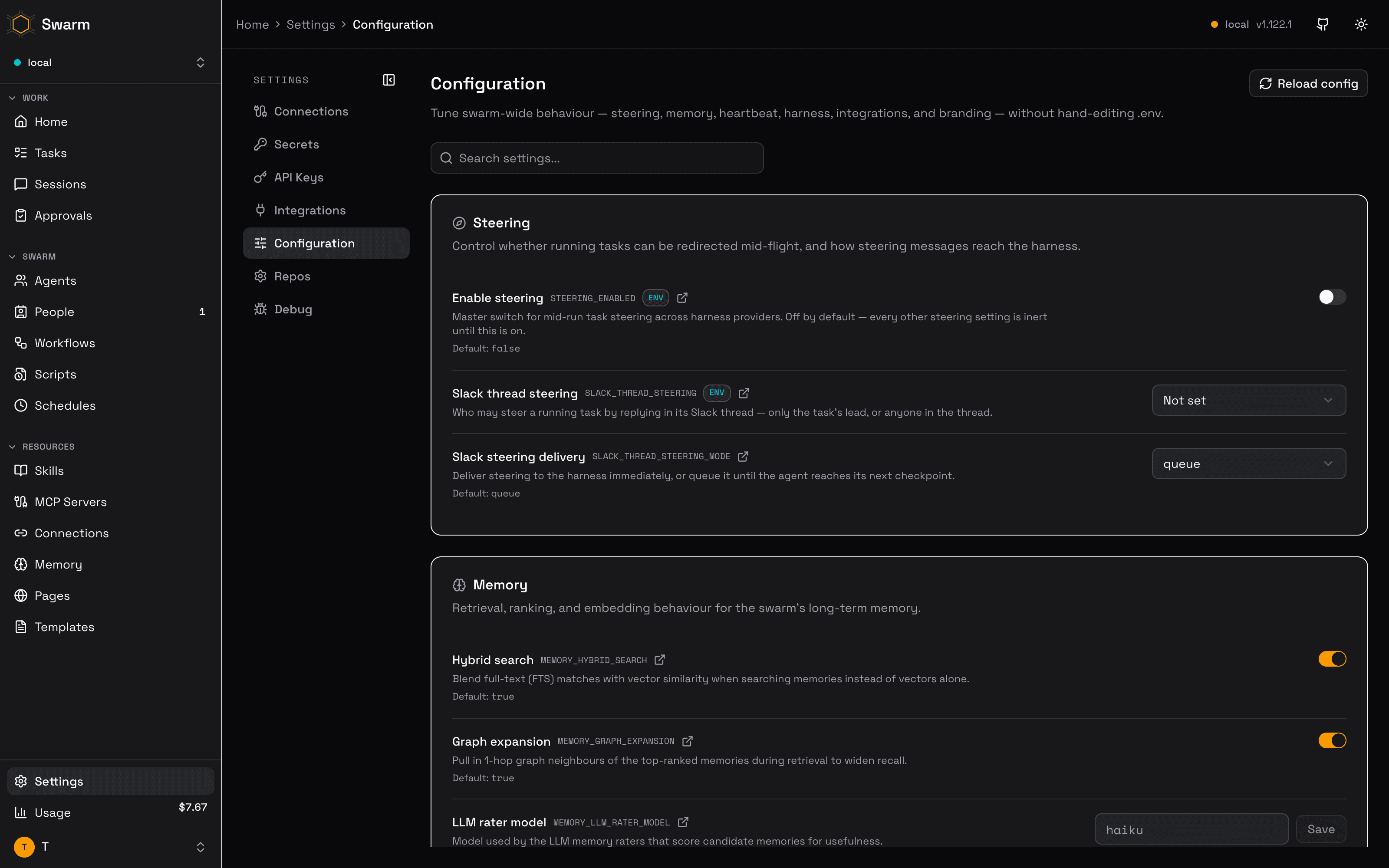
The Configuration page (Settings → Configuration, at /settings/configuration in the dashboard) surfaces the environment variables that shape how your swarm behaves — steering, memory retrieval, heartbeat and crash recovery, harness selection, integration toggles, security, workflow limits, and branding — as editable settings, so you can tune a running deployment without shelling into the host to edit .env files.
How values resolve
Every setting on this page corresponds to an environment variable the API server reads. Saving a value from the dashboard stores it as a global swarm config entry (the same swarm_config store used by the get-config / set-config MCP tools), and the server applies it via an automatic config reload shortly after the save.
Precedence rules:
- Stored values win, at boot and after a save or reload: the server injects global config over the process environment, so a value saved here overrides the same variable set in the deployment environment. Reserved keys (
API_KEY,SECRETS_ENCRYPTION_KEY) are never stored and always come from the environment. - To fall back to the environment value, delete the stored row; the server restores the original environment value on the next reload.
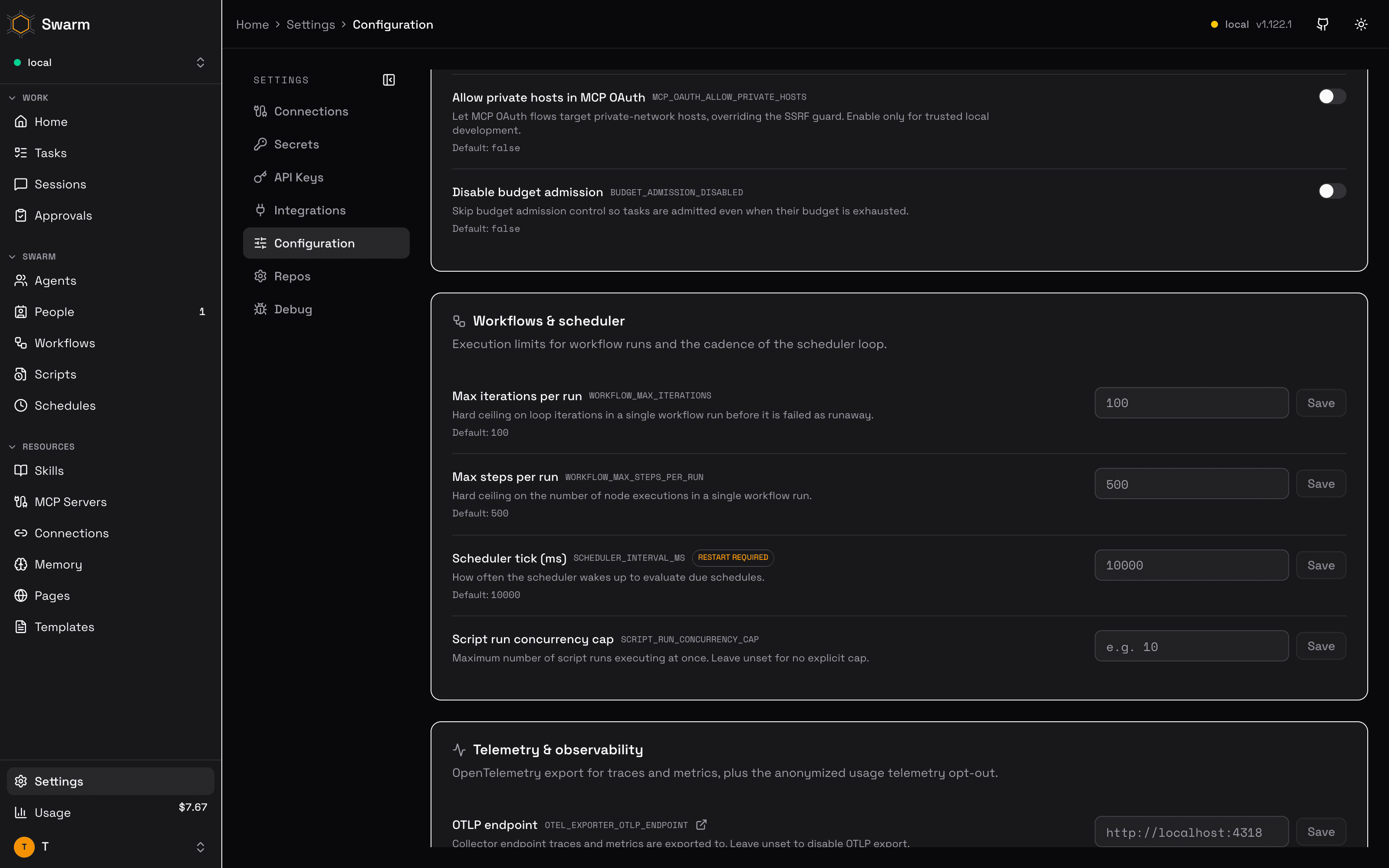
- Settings marked with a Restart required badge are only read at server startup — saving them stores the value, but it takes effect on the next restart.
Each row shows a source chip when the underlying environment variable is set on the server, so you can tell whether the effective value comes from the environment, the stored config, or both.
Groups
Runtime tokens
The Security & access group includes RUNTIME_TOKEN_TTL_HOURS, with a default of 168 hours.
The value must exceed zero and cannot exceed 168 hours.
A change applies to newly minted runtime tokens without a restart.
Runtime tokens can read their own resolved secrets and mint tokens for their assigned tasks.
Task tokens cannot outlive their parent runtime token.
Runtime revocation revokes its task tokens and closes their realtime sockets.
Dev mode
Set SWARM_DEV_MODE=true on the API server, or enable Dev mode under Harness & tools.
The default is false.
This setting bypasses dashboard version checks for deployments that follow main instead of numbered releases.
The header shows a DEV badge while the API reports dev mode.
The dashboard still requires a successful health response.
Keep the API current with the dashboard because dev mode does not check feature compatibility.
It does not enable server features that have separate flags.
A saved change takes effect after automatic config reload and dashboard polling, without a server restart.
Claude transport default
The Harness & tools group includes CLAUDE_TRANSPORT, with cli as the default and sdk as the optional value.
Agents can inherit this default or assign a transport beneath the harness selector on their details page.
An agent override takes precedence over the global default. A repository override takes precedence when the session supplies its repository.
Transport changes apply to future sessions and do not require a worker restart.
The worker resolves this key for each session instead of retaining a scoped value in its deployment environment.
SDK selection is incompatible with an effective Claude Bridge or legacy bridge binary.
PR rooms
The Harness & tools group includes PR_ROOM_REPOS, an empty string by default.
Set a comma-separated owner/repo list to require PR rooms before Claude or Codex workers execute gh pr create.
Repository names ignore case and surrounding spaces. An empty value disables the check.
Create a room with the pr-room skill (app action createRoom), then pass its returned prBody through --body-file.
The body must contain a line such as PR room: prr-abcde23457.
The guard allows edits and unresolved repositories or bodies. It provides a workflow reminder, not a security control.
Keep Export to agent env enabled. Changes reach the next harness session without a worker restart.
Codex OAuth keep-warm
The Harness & tools group includes CODEX_OAUTH_KEEP_WARM_MAX_AGE_HOURS, 120 (5 days) by default.
POST /api/oauth/keep-warm/codex refreshes each Codex ChatGPT pool slot whose token is older than this, through the same locked refresh path tasks use.
Accepted values run from 1 to 216. The config API rejects anything else, and the sweep falls back to 120 if the environment carries an invalid value.
Lower it if OpenAI ends your sessions sooner. Keep it at least one trigger interval under the shortest session you have seen, so a slot refreshes before the cutoff.
The sweep reads the value on every call, so a saved change needs no restart.
| Group | Examples |
|---|---|
| Steering | STEERING_ENABLED, SLACK_THREAD_STEERING, SLACK_THREAD_STEERING_MODE |
| Memory | MEMORY_HYBRID_SEARCH, MEMORY_GRAPH_EXPANSION, MEMORY_RATERS, EMBEDDING_MODEL, EMBEDDING_QUERY_PREFIX, EMBEDDING_DOCUMENT_PREFIX |
| Heartbeat & crash recovery | API_DRAIN_MAX_MS, HEARTBEAT_INTERVAL_MS, HEARTBEAT_STALL_THRESHOLD_MIN, RUNTIME_STALE_THRESHOLD_MIN, HEARTBEAT_PIN_CRASH_RESUME, HEARTBEAT_CHECKLIST_GATE_SCRIPT, HEARTBEAT_CHECKLIST_GATE_MODE, APPROVAL_REQUEST_AUTO_CANCELLATION_DAYS |
| Harness & tools | CLAUDE_TRUST_PRESEED, CODEX_OAUTH_KEEP_WARM_MAX_AGE_HOURS, SCRIPTS_ONLY_MCP, TASK_TOOL_PRELOAD_ENABLED, PI_TOOL_DEFERRAL, PI_CODEMODE, CURSOR_NATIVE_SYSTEM_PROMPT, PI_CODEMODE_MODELS, TASK_TOOL_MANIFESTS, MULTI_RUNTIME_ENABLED, CAPABILITIES, SWARM_ENABLED_TOOLS, OPENROUTER_BASE_URL, OPENROUTER_APP_ATTRIBUTION, WORKER_API_READY_TIMEOUT_SECONDS, CONTEXT_PREAMBLE_MAX_TOKENS, CONTEXT_BOUND_NOTE_TOKENS, MODEL_WINDOW_EXHAUSTED_POLICY, MODEL_LATEST_SOAK_DAYS, MODEL_AUTO_UPGRADE |
| Model tiers | MODEL_TIER_<PROVIDER>_<TIER> for every provider with a tier mapping |
| Database | DB_QUERY_BOUNDED_ENABLED, DB_QUERY_HTTP_BUDGET_MS, DB_QUERY_HTTP_MAX_ROWS, DB_QUERY_MCP_BUDGET_MS, DB_QUERY_MCP_MAX_ROWS, DB_QUERY_CONCURRENCY_CAP, SESSION_LOG_RETENTION_DAYS, AGENT_LOG_RETENTION_DAYS, EVENTS_RETENTION_DAYS, SCRIPT_RUNS_RETENTION_DAYS, DB_RETENTION_DRY_RUN, DB_RETENTION_TICK_BUDGET_MS, DB_RETENTION_CATCHUP_INTERVAL_MS, DB_RETENTION_MAX_STATEMENT_MS, APPS_JSON_COLUMN_MAX_BYTES |
| Integrations | SLACK_MODE, SLACK_DISABLE, SLACK_ALLOW_DEV_SOCKET_MODE, SLACK_RENDER_V2, SLACK_RENDER_V2_DELEGATION, SLACK_CONCLUSION_SETTLE_SEC, SLACK_CONCLUSION_TIMEOUT_MIN, SLACK_TREE_STALL_MIN, GITHUB_DISABLE, LINEAR_DISABLE, SLACK_ALERTS_CHANNEL, SLACK_BLOCK_EXTERNAL_CHANNELS, SLACK_THREAD_WAKE_ON_ANY_MESSAGE, SLACK_LEAVE_THREAD_DISABLE, AGENT_FS_REQUEST_TIMEOUT_MS, COMB_ENABLED, CHAT_SDK_ENABLED, CHAT_SDK_BUFFER_MS, CHAT_SDK_OWNER_WINDOW_MIN, AGENT_FS_PUBLIC_URL, AGENT_FS_LINK_TARGET, AGENT_FS_PROXY, SLACK_REACTION_ACCEPTED, SLACK_REACTION_BUFFERED, SLACK_REACTION_NOW, SLACK_REACTION_STEERED, SLACK_REACTION_COMPLETED, SLACK_REACTION_FAILED, SLACK_STATUS_ICON_COMPLETED |
| Security & access | RBAC_ENABLED, BUDGET_ADMISSION_DISABLED, EXTENSION_ALLOW_INLINE_INSTALL, MCP_OAUTH_ALLOW_PRIVATE_HOSTS, CORS_ALLOWED_ORIGINS (custom list replaces hosted/dev defaults; unset or blank uses defaults), PAGES_FRAME_ANCESTORS (extra origins that may iframe public pages) |
| Workflows & scheduler | WORKFLOW_MAX_ITERATIONS, SCHEDULER_INTERVAL_MS, SYSTEM_ONE_DEFAULT_PROVIDER, SCRIPT_EXECUTOR, SCRIPT_QUICKJS_POOL_SIZE, SCRIPT_EGRESS_ALLOW_PRIVATE, SCRIPT_EGRESS_ALLOWLIST, SEED_AUTOMATIONS_ENABLED, EXTENSION_HANDLER_TIMEOUT_MS, EXTENSION_MAX_CONSECUTIVE_FAILURES |
| Telemetry & observability | OTEL_EXPORTER_OTLP_ENDPOINT, OTEL_SERVICE_NAME, OTEL_EXPORT_API_LOGS, ANONYMIZED_TELEMETRY |
| Branding & URLs | SWARM_ORG_NAME, SWARM_ORG_WEBSITE, SWARM_ORG_TEAM_SIZE, SWARM_ORG_USE_CASE, SWARM_ORG_ACQUISITION_SOURCE, SWARM_BRAND_COLOR, SWARM_ORG_LOGO_URL, DASHBOARD_URL, the "Show our logo on agent-swarm.dev" switch (SWARM_USED_BY_CONSENT), and the public ranking opt-in (PUBLIC_RANKING_ENABLED) |
SWARM_ORG_WEBSITE takes a website and stores its bare hostname (https://www.example.com/about saves as example.com). When SWARM_ORG_LOGO_URL is empty, saving a website fills it with that site's logo, served by the telemetry proxy (https://proxy.desplega.sh/v1/logo?domain=<host>) so no logo key ever reaches your install. A logo you set yourself is never replaced. The "Show our logo on agent-swarm.dev" switch sends your organization name, website, domain, and contact email to Desplega. It also sends your optional job function and quote. This explicit consent works with telemetry on or off. A person approves each logo before it appears. Turning ANONYMIZED_TELEMETRY back on applies without a restart.
The Public ranking row opts the install into agent-swarm.dev/ranking, which ranks installs by tokens used. It needs telemetry on and both SWARM_ORG_NAME (not the placeholder Swarm) and SWARM_ORG_WEBSITE; until then it lists what is missing. Get ranked sends the listing (name, website, category, subcategory, optional description and source code URL) and that is the whole opt-in: the install shows at the next hourly refresh. Renaming the organization updates the listing. Clearing the name or website, or changing the website, leaves the ranking. The listing is stored as the telemetry_ranking config key, which only this row can write. What it sends is in the telemetry reference.
Harness provider and model selection are deliberately absent from this page — they are configured per agent. A global value would silently become the default for every agent in the swarm, so those knobs live on each agent's own configuration instead. OPENROUTER_BASE_URL is a deployment-wide routing endpoint rather than a model choice, which is why it does belong here.
CLAUDE_TRUST_PRESEED is on by default. Before each Claude session it marks the session directory (and the main checkout, when that directory is a git worktree) as trusted in ~/.claude.json. Without it, headless Claude ignores the repo's .claude/settings.json permissions.allow entries. Set it to false to skip the write.
CONTEXT_BOUND_NOTE_TOKENS (off by default) is the context size at which a worker session gets a one-time note. Context is the latest main-thread request's input, cache read and cache write tokens. Once per task, the note tells the agent to finish the current step, store progress, and complete or defer instead of starting new exploration. Claude gets it from the PostToolUse hook. Codex, pi, OpenCode, Amp and Claude Managed sessions get it as mid-turn steering after a tool-call request. The note never blocks a tool call, and missing or unreadable usage means no note. The note reads like "Context is 210,000 tokens (21% of the 1,000,000-token window)."; the percent is left out when the model's window is unknown. Unset, empty, 0 or an invalid value means no note; a positive integer turns it on at that many tokens. To try it on one agent first, keep the global row unset or 0 with no repo override, then set an agent-scoped row (set-config with scope: "agent" and the agent ID, or PUT /api/config). The agent row wins over a global one, so other agents stay off. It applies to new task sessions; running sessions keep their threshold. No worker restart is required. Cursor, Devin, Grok, dsh and other ACP harnesses do not get the note: they lack a per-request size or a mid-session input.
Settings with deeper behavior link out to the relevant guide (for example the task steering and harness providers guides) directly from the row.
Database retention permanently deletes history
Leave SESSION_LOG_RETENTION_DAYS, AGENT_LOG_RETENTION_DAYS, EVENTS_RETENTION_DAYS, SCRIPT_RUNS_RETENTION_DAYS, and CONTEXT_VERSIONS_KEEP_LATEST unset to disable their individual sweeps. Each *_RETENTION_DAYS value must be between 1 and 1,000,000 whole days. CONTEXT_VERSIONS_KEEP_LATEST is a kept-version count per agent and field (1 to 1,000,000); the newest version is never deleted. SCRIPT_RUNS_RETENTION_DAYS deletes only finished runs (completed, failed, cancelled, aborted) and their journal; running and paused runs and runs with an idempotency key are kept. We recommend at least seven days so recent task recovery and memory rating keep their context. Start with DB_RETENTION_DRY_RUN=true, verify the exact would-delete counts, then enable one table at a time. Retention deletes session transcripts, task history, telemetry, script run history, or older profile versions. Event aggregate totals become retention-window totals after an event sweep.
APPROVAL_REQUEST_AUTO_CANCELLATION_DAYS (default 7) sets how many days a pending approval request with no explicit timeout waits before the heartbeat sets it to cancelled. A request with an explicit timeout is never auto-cancelled; it becomes timeout when its deadline passes. 0 turns auto-cancellation off.
APPS_JSON_COLUMN_MAX_BYTES (default 262144, 256 KB) caps the serialized size, in bytes, of a Swarm Apps json column value or default. Accepted values run from 1024 through 16777216 (16 MB); the config API rejects anything else, and the server falls back to the default if the environment carries an out-of-range value. A saved change applies on the next config reload, without a restart. Rows written under a larger cap are not re-checked when the cap is lowered.
Remote controllers
RUNTIME_CONTROLLER_TOKEN_TTL_DAYS sets the lifetime for new remote controller tokens.
The default is 90 days. Accepted values are 1 through 3650 whole days.
Minting a token revokes the previous token and closes its connection.
Changing this setting does not change existing tokens.
RUNTIME_CONTROLLER_GRACE_SEC sets the grace after a remote controller disconnects.
The default is 120 seconds. Accepted values are 0 through 86400 whole seconds.
The API stops provisioning through the controller and preserves its runtimes during the grace.
After expiry, the supervisor marks those runtimes offline, revokes their runtime tokens, and remediates their active tasks.
Failed reconnect handshakes do not extend the disconnect grace.
Both settings apply without an API restart.
Controller credentials belong on the controller host. They are absent from the configuration catalog.
Heartbeat checklist gate
HEARTBEAT_CHECKLIST_GATE_SCRIPT names a global-scope script that runs as the Lead before
each recurring heartbeat checklist task. It returns { quiet: boolean, reason?: string, summary?: string }.
- Unset (the default): the built-in
heartbeat-jev-gateruns when a global credential for one of its providers is set (see Built-in decision gate). With none, the gate stays off. - Set to
offor to an empty value: the gate is off, even when a credential is set. - Set to a script name: that script runs.
HEARTBEAT_CHECKLIST_GATE_MODE decides what the verdict does:
shadow(default) creates every checklist task and tags itheartbeat-gate:quiet,heartbeat-gate:wake, orheartbeat-gate:error. The prompt is unchanged, so the Lead's own outcome stays an independent check on the gate.enforceskips the task on a quiet verdict and adds the gate'ssummaryto the task as a Gate Findings section on a wake verdict.
The gate always fails open. One 60-second deadline covers script lookup, credential setup,
and execution. A timeout, a failure, or a result without a boolean quiet is an error
verdict, and the checklist task is created in both modes. Both keys apply on the next tick
without a restart. Config writes reject modes other than shadow and enforce.
Built-in decision gate
The built-in heartbeat-jev-gate script is a ready gate. It asks a SystemOne decision model,
Jev or Clef, whether the Lead needs to act. The script keeps its original name, and its config
keys keep the HEARTBEAT_JEV_GATE_ prefix, so existing HEARTBEAT_CHECKLIST_GATE_SCRIPT values
still work. It runs by default, in shadow mode, once a provider credential below is set and
HEARTBEAT_CHECKLIST_GATE_SCRIPT is unset. An OpenRouter key does not turn it on while
OPENROUTER_BASE_URL points at a gateway, and HEARTBEAT_JEV_GATE_PROVIDER limits which
provider counts. enforce stays opt-in. Each tick it builds a compact
state of about 1,500 characters (current time, new failures since the previous checklist,
tracked HEARTBEAT items due today or past their DELETE date, the previous checklist result,
task counts, agent status) and asks the model whether the Lead needs to act. It reports a
quiet tick when the model's probability is below the threshold, and puts the probability and
provider in reason. On a wake verdict, summary lists the failures and tracked items behind
it.
| Provider | Model | Credential | Default threshold |
|---|---|---|---|
typesafe | Jev | TYPESAFE_API_KEY | 0.5 |
openrouter | Jev | OPENROUTER_API_KEY | 0.5 |
cloudflare | Clef | CLOUDFLARE_API_TOKEN (or CLOUDFLARE_API_KEY) plus the CLOUDFLARE_ACCOUNT_ID config value | 0.2 |
auto tries them in that order, so Clef runs when it is the only provider configured, when
HEARTBEAT_JEV_GATE_PROVIDER is cloudflare, or when the server refuses OpenRouter because
OPENROUTER_BASE_URL points at a gateway. Each threshold comes from a replay of the same
229 recorded checklist ticks: the highest value that kept every tick where the Lead acted.
Jev at 0.5 would have skipped 100 ticks. Clef at 0.2 would have skipped 57, and above
about 0.21 it starts to miss ticks the Lead acted on. One Jev decision costs about
$0.00004.
Credentials are global values on the Secrets page; a key set only in the API's environment is
not detected. The key never enters the script: it calls the system-one-decide tool, and the
API server reads the key and sends the request, the same way a system-one-decision workflow
node does. OPENROUTER_API_KEY is refused when the effective OPENROUTER_BASE_URL (stored or
in the API's environment) points at a gateway, since the key may then be a gateway token. The
tick then reports an error verdict and the checklist runs.
When you name heartbeat-jev-gate explicitly and no provider is configured, the first tick creates
one approval request asking a person to add a credential or decline, and links it in the heartbeat log's gate reason. The request lists each provider's credential. No Slack message is sent. Until a
credential exists, every tick returns { quiet: false, reason: "jev-gate inactive: <state>" } with no
summary, so the checklist runs as if the gate were off. Ticks never prompt again after that
first request, whether it is pending, approved, rejected, or expired. Adding a credential turns the
gate on at the next tick with no further step. The setup state lives in KV namespace
heartbeat-jev-gate, key setup. Delete it to ask again.
Optional global config values tune the script:
| Key | Default | Meaning |
|---|---|---|
HEARTBEAT_JEV_GATE_THRESHOLD | the provider's | Quiet when p(needs action) is below this, for every provider |
HEARTBEAT_JEV_GATE_PROVIDER | auto | typesafe, openrouter, cloudflare, or auto (that order) |
HEARTBEAT_JEV_GATE_TIMEZONE | UTC | IANA zone for the state's time and due dates |
Run script-run on heartbeat-jev-gate with { "dryRun": true } to see the verdict, the
compact state, and the setup prompt, without creating a prompt or writing KV.
Default SystemOne provider
The Workflows & scheduler group includes SYSTEM_ONE_DEFAULT_PROVIDER: the decision host
for a system-one-decision node, or a system-one-decide call, that names no provider. Jev
(typesafe or openrouter) and Clef (cloudflare) are peers here, and laya and openai
are accepted too. Unset means typesafe, so existing workflows do not change. The value is read
at each decision, so switching it needs no workflow edit and no restart. A node that names its
provider keeps it, and the dashboard shows each node's effective provider and model, for
example cloudflare · clef. Each host still needs its own credential: see
SystemOne Decision. Config writes reject
any other value.
Script executor
The Workflows & scheduler group includes SCRIPT_EXECUTOR, with native as the default
and quickjs as the optional value. Native runs server-side scripts in Bun subprocesses;
QuickJS runs them in a JavaScript sandbox with fewer available globals and no filesystem access.
Choose QuickJS only for scripts compatible with its API surface.
The setting applies swarm-wide. Saving it triggers the normal config reload, and new script
runs use the selected executor without an API restart. Runs already in progress keep their
executor. Config writes reject values other than native and quickjs.
SCRIPT_QUICKJS_POOL_SIZE sets the maximum number of QuickJS worker threads: default 4,
accepted range 1–32 whole workers. Workers start lazily; excess runs wait for a free worker.
The size is read when the shared pool is first created. Restart the API after changing it;
config reload does not resize an existing pool. Invalid values are rejected by config writes
and reported as an executor error before a deployment environment can create a pool.
More workers can improve concurrent throughput but retain more WASM memory, up to each
script's memory limit per busy worker. SCRIPT_RUN_CONCURRENCY_CAP still controls admission
of script runs separately, so raising the pool size alone cannot exceed that cap.
SCRIPT_EGRESS_ALLOW_PRIVATE (default off) and SCRIPT_EGRESS_ALLOWLIST (default empty) set
which hosts QuickJS scripts can fetch. Off and empty mean any public host and no private,
loopback, link-local or metadata address. The allowlist takes comma-separated host[:port]
patterns; config writes reject other shapes. The native executor does not enforce either key
yet. See Scripts runtime § Egress policy.
Editing
Controls match the value type:
- Toggles (feature flags) persist immediately when switched.
- Selects (enumerated values such as
SLACK_THREAD_STEERING_MODE) persist on change. - Duration inputs offer units while preserving the setting's underlying unit.
- Multiple-choice controls edit list settings such as memory raters.
- JSON inputs require an object before saving.
- Text and number inputs show a Save button once the value differs from what is stored.
Values supplied only by the deployment environment show an environment marker. Select Override, edit the draft, and save explicitly to create a stored override; the dashboard does not display the hidden environment value as a catalog default.
Every row shows its default, and rows with a stored value offer a Reset action that deletes the stored entry and returns the setting to its default (or to the environment value, if one is set). The Reload config button in the header forces an immediate config reload — useful after changing environment variables outside the dashboard.
Credentials live elsewhere
This page intentionally excludes secrets. Integration credentials (Slack tokens, GitHub app keys, OAuth secrets) are managed on the Integrations pages, and swarm-wide secret values on the Secrets page — see the secrets encryption guide.
Multiple runtimes per agent
MULTI_RUNTIME_ENABLED is on by default, letting several processes serve the same agent — each is tracked with its own capacity and liveness, and the agent's limit moves to its agent-scoped AGENT_MAX_TASKS setting (seeded from the agent's current limit the first time it registers, so enabling the flag does not change what the swarm enforces).
Workers must be updated before enabling it: with the flag on, a worker that does not identify its runtime is rejected at registration and shutdown. A worker that stops reporting for RUNTIME_STALE_THRESHOLD_MIN (default 5 minutes) stops counting toward its agent, and an agent whose last live worker expires is marked offline. See the multi-runtime agents guide for the rollout order, shared-workspace Compose example, rollback behavior, and the heartbeat and crash recovery runbook.
Workspace state is not shared for you. Work for one agent can continue on a different process than the one that started it, so runtimes sharing an AGENT_ID need compatible workspace state. In Docker Compose or similar deployments, give them the same persistent workspace/repository volume when continuation depends on local files. If their workspaces are independent, task continuation must rely only on state that can be reconstructed from shared sources — the repository, the control plane, or attachments — because enabling this setting does not synchronize arbitrary local filesystem state between workers.
OPENROUTER_BASE_URL points the harnesses at a model gateway
This is the one exception to the "no model knobs here" rule above, and it is not a model choice: it sets where OpenRouter-shaped requests go, not which model runs. Point it at any gateway serving OpenRouter-compatible GET /models and POST /chat/completions — openrouter.ai, OrcaRouter, or a self-hosted proxy — and the OpenCode and pi-mono harnesses, model refreshes, and internal summarizers all route through it. Leave it blank for openrouter.ai.
A saved value reaches both sides without a restart. The API server re-injects it over its process environment on the debounced config reload. Each worker fetches the resolved config before starting a task and passes it into the harness adapter, so the change lands on that worker's next task; a task already running keeps the gateway it started with.
The gateway credential is not set here — OPENROUTER_API_KEY belongs on the Secrets page or in the worker environment. Setup for each harness, model-string rules, and which harnesses this cannot redirect: Model Gateways.
OPENROUTER_APP_ATTRIBUTION credits direct OpenRouter traffic to Agent Swarm
On by default. Requests sent straight to openrouter.ai carry HTTP-Referer: https://agent-swarm.dev, X-OpenRouter-Title: Agent Swarm and X-OpenRouter-Categories: personal-agent,cloud-agent, so OpenRouter counts them toward the Agent Swarm app. A gateway or any other host gets none of these headers. Set false to stop sending them; the change lands on each worker's next task. Details: App attribution.
WORKER_API_READY_TIMEOUT_SECONDS is bootstrap-only
Every worker and lead container's docker-entrypoint.sh polls the control-plane API's public GET /health endpoint before doing anything else that depends on it (fetching config, syncing skills, restoring services). If the API never becomes reachable within WORKER_API_READY_TIMEOUT_SECONDS (a positive integer, default 90), the container logs a stable [entrypoint] FATAL: API readiness timed out after Ns waiting for <url>; exiting. line and exits non-zero rather than starting half-provisioned.
This check runs before the container can reach the API at all, so it can only ever read the value from its own process environment — a row saved here documents and validates the setting (and is what the Restart required badge refers to), but it cannot reach an already-waiting container. Set it as a real deployment environment variable on the worker/lead container, not just in the dashboard.
CONTEXT_PREAMBLE_MAX_TOKENS is read once at process start
Every follow-up task gets a bounded text summary of its parent/ancestor task chain prepended to its prompt, uniformly across all harness providers (not just those with native session resume). CONTEXT_PREAMBLE_MAX_TOKENS (default 2000, ~4 chars/token, so ~8,000 chars) caps that summary's size. It exists to prevent the SIGTERM-143 context-saturation failure mode seen with unbounded session resumes — raising it too far risks reintroducing that failure, so keep it well below the target model's context window.
The API server reads this value into a module-level constant at boot, so a saved value takes effect on the next restart (the Restart required badge on this row).
MODEL_WINDOW_EXHAUSTED_POLICY controls what happens when every key has exhausted a model's weekly window
A Claude OAuth key can hit a weekly window scoped to a single model family — seven_day_overage_included (Fable), seven_day_opus, or seven_day_sonnet — without going rate_limited for the whole key; see Model-scoped weekly windows. MODEL_WINDOW_EXHAUSTED_POLICY decides what a worker does when every key in the pool has exhausted the task model's window: fail (default) fails the task immediately with the earliest reset time, so it can be re-dispatched with another model or modelTier; fallback restores the legacy behaviour of picking a key at random. Takes effect on the worker's next key pick; no restart required.
Model tier defaults
MODEL_TIER_<PROVIDER>_<TIER> sets the model a worker of that harness runs for a modelTier task, for example MODEL_TIER_CLAUDE_SMART or MODEL_TIER_CODEX_REGULAR (provider dashes become underscores: MODEL_TIER_CLAUDE_MANAGED_SMART). The page has a Model tiers group with one row per provider and tier. Each row shows the built-in default and the concrete model the API resolves the current value to (Resolves to claude-opus-5-5 via latest:anthropic/opus), read from GET /api/models-catalog/tiers, so it always matches what a claim would pick. A value is a concrete model id, a CLI alias such as opus, or a moving alias latest:<anthropic|openai|openrouter>/<target>[@stable|@any]. A MODEL_TIER_* value that does not run on the key's harness is rejected on write. Saving auto-reloads; the next claim uses it.
The API server resolves the model when a worker claims the task and records resolvedModel, modelSource and modelAlias on it. Precedence: the task's own model, then the claiming worker's MODEL_TIER_* env, then this setting, then the built-in default. latest: aliases on the @stable channel (the default) skip preview ids and models released less than MODEL_LATEST_SOAK_DAYS (default 2) days ago; unpriced models are never picked. Set MODEL_AUTO_UPGRADE=false to keep every alias on its last resolution. Each change of an alias's resolution is written to model_alias_resolutions. See Model tiers.
Task tool preloading
TASK_TOOL_PRELOAD_ENABLED defaults to true. With it enabled, each new agent MCP session reads
TASK_TOOL_MANIFESTS, selects tools using the authenticated agent's current task, and marks their
MCP metadata with anthropic/alwaysLoad: true. Claude Code supports this annotation; no reduction
in tool searches is claimed for other harnesses. Existing sessions retain their original selection.
Both settings can be stored in global or agent-scoped configuration. Agent-scoped values override global values; resolved configuration takes precedence over environment defaults. The dashboard edits global values. For a small pilot, use agent-scoped configuration instead.
{
  "taskTypes": {
    "review": ["get-tasks", "script-run", "get-repos"]
  },
  "schedules": {
    "12345678-1234-4234-8234-123456789abc": ["script-run", "kv-get"]
  }
}
Keys match exactly. A schedule entry replaces the task-type selection, including an empty array to opt out. Each entry accepts at most 16 registered swarm tool names. Unsupported shapes or unknown names are rejected on config writes. Invalid environment values fall back to ordinary discovery with a server warning. Missing task context, an unowned task, or no match adds no tools. Slack tools preload only when the task has Slack context. Capability filters, scripts-only mode, and tool-call permissions still apply; preloading never grants access or removes searchable tools.
Each selected tool adds its description and input schema to the initial model context. A long schema can cost more than the search it replaces. Compare input/cache tokens, cost, and tool-search steps on the same recurring targets when configuring manifests. Turn the flag off to restore ordinary discovery for new sessions. The flag is enabled by default; a matching manifest is still required to preload task-specific tools.
pi tool deferral
PI_TOOL_DEFERRAL defaults to true and only affects pi workers. A pi session keeps the core
lifecycle tools, and any tool a task manifest preloads, in the model's tool list. Every other swarm
tool, and every installed MCP server tool, is marked deferred and is loaded on demand through pi's
tool_search. Set it to false to declare every tool up front; the system prompt switches back to
the direct-tool guidance in the same task. See
Harness providers.
pi codemode
PI_CODEMODE defaults to false and only affects pi workers. When it is true, every pi
session gets pi's codemode tool. See
Harness providers.
PI_CODEMODE_MODELS defaults to false and only affects pi workers that also have
PI_CODEMODE on. When it is true, codemode scripts can call pi's models API (classifiers and
image generation), and that usage is counted in the session cost.
Cursor native system prompt
CURSOR_NATIVE_SYSTEM_PROMPT defaults to false and only affects cursor workers. Off, the swarm
prompt rides at the top of the first user message, on top of Cursor's own system prompt. On, the
adapter passes it as Cursor's systemPrompt, which Cursor enables per account; when Cursor rejects
the option, the session falls back to the first-message path. See
Harness providers.
Seeded automation auto-enable
SEED_AUTOMATIONS_ENABLED defaults to true and controls whether a freshly seeded workflow or
schedule that needs no integration and no required param/placeholder — and whose own template
doesn't recommend staying off — arrives already enabled at boot, instead of disabled-but-inventoried.
An item that needs a credential or a param this install doesn't have is unaffected either way.
This includes daily-swarm-update-check, a zero-config schedule that calls the public GitHub
releases API on a daily cron and posts to the configured admin channel when a newer
desplega-ai/agent-swarm release is available — the only outbound network call and notification
this switch turns on by default. Turn the switch off, or disable that schedule individually from
its details page, to stop it.
The API server reads this value at boot when seeding runs (restartRequired): flip it, then restart
to change what a future seed pass creates. It does not retroactively enable or disable automations
already created on this install.
Chat SDK
CHAT_SDK_ENABLED (boolean, default false, applies on save) starts the Chat SDK channel for the adapters defined in CHAT_SDK_ADAPTERS. Edit CHAT_SDK_ADAPTERS (JSON, applies on save) on the Chat SDK card under Settings → Integrations, not on this page.
CHAT_SDK_BUFFER_MS (number, default 10000, 1 to 600000) is how long the channel waits for more messages in a thread before it creates one task from them. A message that starts with !now creates the task at once. A new value applies when no thread is waiting.
CHAT_SDK_OWNER_WINDOW_MIN (number, default 15, 0 to 1440) applies to Telegram groups only. It is how long after a chat task ends the group keeps the same owner, and the requester's plain messages count only inside this window; everyone else has to mention the bot or reply to it. 0 keeps the owner only while the task is open. DMs and other adapters' threads keep their owner with no time limit. A new value applies to the next message.
Voice-note transcription is configured on the Transcription card under Settings → Integrations, not on this page. See Voice notes.
Comb
COMB_ENABLED (default on) controls Comb, the agent-fs review space in the dashboard. Unset, Comb is on when AGENT_FS_API_URL is set and a browser can reach agent-fs: AGENT_FS_PUBLIC_URL is set, AGENT_FS_PROXY is on, or AGENT_FS_API_URL is itself browser-reachable (not a single-label docker host, *.internal, or a private IP). Otherwise it stays off and /status agent_fs.comb.reason says what is missing. An explicit true or false wins; either way it needs AGENT_FS_API_URL. With Comb on, the sidebar shows a Comb item and /file opens the swarm drive. Each person connects their own agent-fs identity in the browser. The key stays in that browser and never reaches the swarm API. Saving the flag auto-reloads, and the dashboard picks it up on its next status poll (30 seconds at most).
AGENT_FS_PUBLIC_URL is the agent-fs URL that browsers use. It defaults to AGENT_FS_API_URL. Set it when the API reaches agent-fs on an internal hostname, for example http://agent-fs:7433 in Docker Compose, where the browser needs http://localhost:7433. The value must be an http(s) URL with no query string or fragment.
AGENT_FS_LINK_TARGET (dashboard, live, or unset) picks where agents and task attachments link people for files. Unset keeps the automatic choice. dashboard opens Comb at APP_URL; workers need APP_URL in their own environment. live opens the agent-fs live app. See Links to agent-fs files.
AGENT_FS_PROXY (default false) makes the API serve agent-fs at /agentfs, plus the public share pages at /share and /site, so the browser reaches a bundled agent-fs with no public port. Comb then uses <public API URL>/agentfs when AGENT_FS_PUBLIC_URL is blank. An explicit AGENT_FS_PUBLIC_URL still wins. The API reads the flag on every request, so a saved value applies with no restart. See Bundled agent-fs behind the swarm API.
Inline extension install
EXTENSION_ALLOW_INLINE_INSTALL defaults to false. When it is true, lead agents, the operator,
and dashboard users can install an extension from a manifest and files sent in the request, not only
from the predefined catalog. Workers stay catalog-only. The value is read on every request, so it needs no
restart. An enabled extension is trusted code in the API process, and a lead can change this key, so
read inline install before turning it on.
Config rows in agent env
Every config row has an Export to agent env flag (exportToEnv). Workers copy a row into the
environment their harness and its shell tools inherit only when the flag is on. A row with the flag
off never appears in env, printenv, or /proc/<pid>/environ in an agent shell, and a copy set
on the container itself is dropped too.
- Default. New rows export. Rows that existed before the flag shipped kept exporting, except a short deny list of keys only the API server reads (integration webhook and signing secrets, OAuth client secrets, the API's own agent-fs key, script connection secrets).
- Always restricted. Some keys can never export:
SLACK_APP_TOKEN,SLACK_SIGNING_SECRET,GITHUB_APP_PRIVATE_KEY,GITHUB_WEBHOOK_SECRET,GITLAB_WEBHOOK_SECRET,LINEAR_CLIENT_SECRET,LINEAR_SIGNING_SECRET,JIRA_CLIENT_SECRET,JIRA_WEBHOOK_TOKEN,AZURE_DEVOPS_WEBHOOK_SECRET,AGENTMAIL_WEBHOOK_SECRET,API_AGENT_FS_API_KEY, and everyconnection.<slug>.secret. The config API rejectsexportToEnv: truefor them. - Keep harness keys on. Harness credentials (
CLAUDE_CODE_OAUTH_TOKEN,OPENROUTER_API_KEY, and the other providers),GITHUB_TOKEN,GH_TOKEN,GITLAB_TOKEN,AZURE_DEVOPS_TOKEN, and the agent's ownAGENT_FS_API_KEYare read from the environment by the harness,gh,glab,az, and git. Turning them off breaks auth. - When it applies. Workers re-read the flag for every new task, so a change reaches the next harness session without a restart. The worker process itself picks it up on its next restart.
The flag controls the environment only. It does not change who may read the value through
get-config or the API. An agent that needs a row kept out of its env uses it server-side: a script
connection or a script credential binding sends the secret on the agent's behalf, so the value never
enters the agent's context.
Set the flag in the dashboard (the Export to agent env switch on a config entry), with
set-config (exportToEnv: false), or with PUT /api/config.
Access control
Reading configuration requires dashboard access (API key). Writes go through the config API's RBAC gate (config.write.any): operator and user tokens can save, and agent principals are restricted to lead agents.
Adding a new setting
If you are contributing a new operator-facing environment variable to Agent Swarm, register it in the configuration catalog at apps/ui/src/lib/configuration-catalog.ts (group, value kind, default, description, and docs link) so it appears on this page. Reserved bootstrap keys (API_KEY, SECRETS_ENCRYPTION_KEY) and credentials must never be added to the catalog.
CORS_ALLOW_ANY_ORIGIN is deployment-only and is not available in Configuration. Set it in the API deployment environment and restart the API for arbitrary-origin bearer-token clients using credentials: "omit". It never grants credentialed CORS to an unlisted origin: cookie-authenticated responses, including page JSON and /@swarm/api/*, still require CORS_ALLOWED_ORIGINS (or the built-in defaults). HTTP, MCP, and database config writes reject this reserved key; legacy stored rows are ignored during startup and reload and can be deleted. Prefer configuring trusted origins with CORS_ALLOWED_ORIGINS.
EXTENSION_ALLOW_LEAD_ACTIVATION is reserved and deployment-only, so it is not
editable here. Set it to false in the API server environment and restart all
API replicas to require operator/user authentication for extension enable,
disable, and version activation. See extension trust controls.
Runtime pools
RUNTIME_POOLS_ENABLED enables runtime pool and controller configuration. It defaults to false.
See the runtime pools guide for topology, lifecycle, controllers, and troubleshooting.
Restart the API after enabling it to seed built-in controllers and the default static pool.
Agents remain unbound until an operator assigns a pool.
Pool routing requires MULTI_RUNTIME_ENABLED=true. Otherwise, the heartbeat uses legacy routing.
The API checks the pool flag for each routing event and timer tick.
| Setting | Default | Behavior |
|---|---|---|
RUNTIME_WAKE_GRACE_SEC | 15 | Seconds to wait for a live worker before selecting a sleeping pool agent. |
RUNTIME_WAKE_REROUTE_SEC | 600 | Seconds before the router releases a pending wake assignment and tries another eligible agent. |
RUNTIME_ROUTING_INTERVAL_MS | 5000 | Milliseconds between routing sweeps. Restart the API after changing this value. |
RUNTIME_SUPERVISOR_INTERVAL_MS | 5000 | Milliseconds between runtime demand and lifecycle checks. Restart the API after changing this value. |
RUNTIME_PROVISION_CONCURRENCY | 8 | Maximum simultaneous provisions. Pool caps, demand reservations, retry deadlines, and circuit checks still apply. |
RUNTIME_PER_TASK_EXIT_GRACE_SEC | 60 | Seconds after task completion before forced per-task teardown. Runner shutdown permits earlier teardown after cost, logs, and context reporting. |
RUNTIME_PROVISION_TIMEOUT_SEC | 300 | Seconds before registration timeout terminates the runtime and counts one failure. |
RUNTIME_PROVISION_MAX_ATTEMPTS | 3 | Provision failures before the oldest ready pending task fails and notifies the Lead. |
RUNTIME_CIRCUIT_THRESHOLD | 5 | Consecutive provision failures before the pool stops provisioning. |
RUNTIME_CIRCUIT_OPEN_MIN | 10 | Minutes before the pool permits one trial provision. Failure opens the circuit again. |
RUNTIME_SOCKET_GRACE_SEC | 60 | Seconds after the last push socket disconnect before a provider check. Running runtimes keep their tasks. |
RUNTIME_TOKEN_ROTATE_BEFORE_MIN | 60 | Minutes before token expiry to drain busy runtimes or terminate idle runtimes. |
RUNTIME_LEASE_RENEW_BEFORE_SEC | 300 | Seconds before E2B lease expiry to renew wanted runtimes. |
RUNTIME_E2B_BUILD_TIMEOUT_SEC | 600 | Maximum E2B template build duration in seconds. Builds run independently of supervisor ticks. |
RUNTIME_ROTATE_BEFORE_SEC | 600 | Seconds before the continuous runtime limit to drain E2B runtimes. |
E2B_MAX_CONTINUOUS_SEC | 3600 | E2B continuous limit in seconds. Use 3600 for Hobby or 86400 for Pro. Controller configuration overrides this default. |
Retries wait 30, 90, then 180 seconds. Agent rows persist retry counts and deadlines across API restarts. First registration resets the agent retry state and closes the pool circuit. Healthy re-registration leaves the circuit unchanged. No ready demand or an open circuit clears agent retry state. The supervisor stores scrubbed errors on the runtime, pool, and controller. The circuit blocks provisioning and assignments to sleeping pool agents. Existing runtimes continue their tasks. After the circuit expires, one provision may await registration. Registration closes the circuit. Failure opens the circuit again. The supervisor starts provisions with bounded concurrency. A failure preserves sibling provisions and prevents further requests for that agent during the tick. Per-task runtimes preserve their sessions and tokens until runner shutdown or the exit grace deadline. Task completion starts the grace period. It does not immediately terminate the runtime. Token rotation drains runtimes before termination. A later tick checks activity again before terminating an idle runtime. Demand can create replacements within the pool cap. The supervisor terminates drained runtimes after their tasks finish. The failure settings accept positive integers. Socket grace also accepts zero for an immediate provider check. These settings apply after configuration reload. The supervisor interval requires a restart.
E2B pools provision with pool ttlSec or a 900-second lease, bounded by provider limits.
Renewal stores E2B's actual expiry. If the API stops, the lease bounds sandbox lifetime.
Continuous rotation uses the same drain path as token rotation. Busy runtimes finish their tasks before termination.
An unplanned pause resumes a wanted idle runtime. A pause during active work triggers task recovery and sandbox termination.
E2B requires E2B_API_KEY and an HTTPS worker URL. Controller readiness records configuration failures.
Pool creation succeeds with a warning while the builtin E2B controller remains unready.
Plain images name E2B templates. A docker:// image builds and caches a template during first provision.
Custom images must extend the slim or full Agent Swarm worker image. Changing the image clears the template cache.
Per-task pools pay for the boot sequence on every sandbox start.
See the runtime provider runbook for details.
boxd requires BOXD_API_KEY and an HTTPS worker URL. A deployment BOXD_API_KEY seeds the builtin-boxd controller; without it, seeding creates no boxd controller.
boxd machines have no lease, so BOXD_DELETE_AFTER_SEC in controller configuration is the safety net when the API stops.
See the runtime provider runbook for details.
The routing and wake settings accept nonnegative integers. Zero permits an immediate wake or reroute. For the routing interval, zero uses the default. Positive values below 500 use 500 milliseconds. Negative or invalid deployment values use the default interval.
The Harness & tools group also exposes these API settings for provisioned workers:
| Setting | Default | Behavior |
|---|---|---|
RUNTIME_WORKER_API_URL | Public API URL | API URL reachable by provisioned workers. Controller WORKER_API_URL overrides it. |
RUNTIME_DOCKER_HOST | DOCKER_HOST or local socket | Unix socket stored when seeding the built-in Docker controller. Restart required. Existing controller configuration takes precedence. |
E2B_API_BASE | SDK default | Custom E2B API endpoint. Controller configuration overrides this fallback. |
DOCKER_HOST | unix:///var/run/docker.sock | Unix socket for built-in Docker controllers. Restart the API to seed a new controller. |
DOCKER_NETWORK | Unset | Docker network for provisioned workers. |
DOCKER_EXTRA_HOSTS | Unset | Comma-separated host:address entries. Docker also includes host.docker.internal:host-gateway. |
Stored global settings override deployment environment values after configuration reload.
Built-in controllers read the API process environment as their Docker fallback.
Public controller configuration overrides this fallback. Encrypted controller configuration overrides public controller configuration.
Worker URLs use controller WORKER_API_URL, then RUNTIME_WORKER_API_URL, then the public API URL.
At startup, Docker seeding checks RUNTIME_DOCKER_HOST, then DOCKER_HOST, then /var/run/docker.sock.
An explicit RUNTIME_DOCKER_HOST seeds a controller even when Docker is offline.
Otherwise, the selected Docker host must identify an existing Unix socket.
Seeding stores RUNTIME_DOCKER_HOST as controller configuration, so it overrides the DOCKER_HOST fallback.
RUNTIME_DEFAULT_DELIVERY selects poll or push for pools without an explicit delivery mode.
It also applies to agents without a bound pool. The API returns poll while runtime pools are disabled.
Workers receive the resolved mode during registration. Pool changes apply at the next registration.
Set these variables in the worker environment:
| Variable | Default | Purpose |
|---|---|---|
SWARM_DELIVERY_MODE | Registration response | Override delivery with poll or push. |
RUNNER_PUSH_SAFETY_POLL_MS | 30000 | Positive interval in milliseconds between safety fetches for push delivery. |
RUNNER_FINISH_RETRY_MAX_SEC | 300 | Positive limit in seconds for final progress and finish retries after network errors or HTTP 5xx. HTTP 4xx are not retried. |
Push workers fetch work on nudges and safety ticks. They also fetch current state after reconnecting.
They retain a 30-second ping interval and temporarily use poll delivery after 60 seconds without a socket.
A lead uses poll delivery when the API enables LEAD_MONITOR_CHANNELS=true.
The runner honors this restriction, including when a worker override requests push, and logs a warning.
Workers log their active delivery mode at startup and whenever it changes.
The log identifies the registration response or the worker override that selected the mode.
RUNTIME_DEFAULT_DELIVERY defaults to poll. A pool's explicit mode takes precedence.
Controller credentials remain encrypted in the controller record. Workers do not receive them through global configuration.
Company profile
These optional global settings use the existing PUT /api/config endpoint. An empty string clears a value. Changes apply without a restart.
| Key | Values |
|---|---|
SWARM_ORG_TEAM_SIZE | 1 (Solo), 2-10, 11-50, 51+ |
SWARM_ORG_USE_CASE | features, bugs, review, ops, docs, data, content, research, seo, admin |
SWARM_ORG_ACQUISITION_SOURCE | search, github, social, colleague, newsletter, event, ai_assistant, hacker_news, other |
A website, team size, and use case enable the full fleet benchmark. The API sends team size and use case as peer filters only when telemetry is on. The use cases content, research, seo, and admin compare against the whole fleet until the telemetry catalog lists them.
POST /api/used-by accepts {granted, contactEmail?, contactFunction?, quote?}. A grant requires a valid contact email. The optional quote allows at most 280 characters. Contact function accepts engineer, eng_lead, founder, product, marketing, sales, research, ops, or other.
The explicit consent sends these details to Desplega, even when telemetry is off. The API stores them in SWARM_USED_BY_CONTACT_EMAIL, SWARM_USED_BY_CONTACT_FUNCTION, and SWARM_USED_BY_QUOTE. Revocation clears all three local values after the proxy accepts the request. Desplega keeps the earlier grant record because the proxy has no delete path. To request deletion of that record, contact contact@desplega.sh.
Sessions
Organize and triage swarm sessions in the dashboard: groups, Inbox, Done and Later, search, keys, tabs, the split, the phone layout, and the Legacy view
Comb
Review agent-written agent-fs files in the dashboard: comment on passages, mention teammates, send comments to the swarm, and review the changes